Over a period of time, we’ve been working on several client projects, and one of them came with a particularly interesting challenge: the need for extensive, custom form functionality. This gave us the perfect opportunity to explore how easy (or difficult) it actually is to extend Umbraco Forms.
In this article, we’d like to walk you through some of the features we built as extensions to Umbraco Forms. It’s worth noting that the work is still in progress.
The code is publicly available in our repository. We’ve also published an initial alpha version of one of the packages, which can be found here. This alpha release is meant to give early adopters a first look at the direction we’re taking, and we gladly welcome any feedback.
We hope to publish a beta version soon, followed by a release candidate, as we move toward a stable first release.
We chose to focus on two main features. The first is a workspace view that makes it possible to see which files have been uploaded for each individual form and to search through them. The second feature is the ability to display various form statistics, for example, the number of workflows attached to a form, as well as insight into which workflows are failing. All this information is presented in a dedicated statistics dashboard.
In addition to explaining these features, we also share more about the modular architecture of the package and how we have extended the Management API to support these new capabilities.
Modular Construction
Umbraco.Community.FormsExtensions is structured to allow granular extension and flexible releases of new features. Its modularity is evident in several aspects:
Separation by Feature: The repository contains distinct packages (e.g. Media, Statistics) each with their own Client and Backend implementations (e.g. Media.Client, Statistics.Client, etc).
Extension Manifests: Frontend modules are registered via manifest.ts or manifests.ts files (see: media repository manifests.ts), specifying types (like repository, dashboard, modal), aliases, and the modules to load. This allows the Umbraco backoffice to dynamically discover and load these extensions.
Auto-Generated Client SDKs: Both Media and Statistics clients use OpenAPI codegen (openapi-ts.config.ts) to produce strongly-typed SDKs from an API spec, enabling a clear, decoupled interaction between client and backend.
Vite-powered Assets: Each module can be built and distributed as a standalone bundle (vite.config.ts) with its own static assets for use as Umbraco plugins.
In the .Common project, we don’t define the Swagger/OpenAPI spec itself. Instead, we centralize logic for registering the OpenAPI definition and for customizing Swagger generation. This ensures consistent API grouping, versioning, and security across all extension sub-projects (e.g. Statistics, Media).
How it works
1. Registration Logic in .Common
The .Common project contains extension methods for registering and configuring Swagger (OpenAPI) using SwaggerGenOptions.
It may also contain custom filters, such as an IOperationFilter (like FormsExtensionsApiOperationSecurityFilter) to programmatically control operation-specific details in the generated OpenAPI spec (e.g. security, tags, etc.).
namespace Umbraco.Community.FormsExtensions.Common.DependencyInjection;

public static class FormsExtensionsApiConfiguration
{
    public const string ApiName = "forms-extensions-api";
}
Sample: FormsExtensionsApiConfiguration.cs
public class ConfigureFormsExtensionsApiSwaggerGenOptions : IConfigureOptions<SwaggerGenOptions>
{
    public void Configure(SwaggerGenOptions options)
    {
        options.SwaggerDoc(
            FormsExtensionsApiConfiguration.ApiName,
            new OpenApiInfo { Title = "Forms Extensions API", Version = "1.0" }
        );

        options.OperationFilter<FormsExtensionsApiOperationSecurityFilter>();
    }
}
Sample: Configuring swagger in ConfigureFormsExtensionsApiSwaggerGenOptions
2. Controllers Register Themselves with the Shared API Definition
Each API controller in extension projects (e.g. Statistics, Media) declares itself as part of the central API group via the [MapToApi(FormsExtensionsApiConfiguration.ApiName)] attribute.
This tells Swagger to include those endpoints under a single named API group, making the OpenAPI definition modular but unified.
[VersionedApiBackOfficeRoute("collection/form-statistics")]
[MapToApi(FormsExtensionsApiConfiguration.ApiName)]
[ApiExplorerSettings(GroupName = "Form Statistics")]
public class FormsStatisticsController(IFormsStatisticsService formsStatisticsService)
    : ManagementApiControllerBase
{
    // ...controller logic
}
The same pattern is used for other controllers in their respective projects.
3. Resulting in Unified, Discoverable APIs
At runtime, all controllers marked with your shared ApiName appear under one OpenAPI definition in the Umbraco backoffice (or Swagger UI).
This setup is modular (each project sells logic/features independently) but centralized for discoverability and configuration.
The .Common project does not house APIs or the Swagger spec itself, but contains configuration, constants, and filters for Swagger/OpenAPI. Controllers in the subprojects plug into this setup using attributes. That way, you get a scalable, unified API in Umbraco without repeating configuration or logic.
The package augments Umbraco's Management API with custom endpoints that allow for programmatic access to Forms data (e.g. uploaded files and statistics).
Auto-generated frontend client The frontend API client is generated automatically from this spec with openapi-ts, so your code stays safe, fast, and always in sync with the backend.
The backend exposes APIs documented in an OpenAPI (swagger.json) spec. Each frontend extension contains an openapi-ts.config.ts file. This file configures the generator to use the central Swagger spec and specifies the output directory for the TypeScript client code:
To generate or update the frontend API client, run:
npm run generate:server-api
This command will:
Use the configuration in openapi-ts.config.ts
Parse your referenced swagger.json
Generate/update the TypeScript client SDK files in the appropriate directory (like src/statistics/backend-api)
This approach ensures consistency, makes regeneration easy, and can be integrated into CI/CD pipelines or local development workflows. If the API spec changes, just re-run the script to update the frontend’s strongly-typed API client.
Class Libraries and RCLs Each feature within Umbraco.Community.FormsExtensions is implemented as its own class library. This modular approach provides clear boundaries between features and supports separate development, testing, and packaging. The frontend for each module is built (typically using Vite, as seen in vite.config.ts). The build output of each frontend project is emitted to the wwwroot directory of the corresponding Razor Class Library (RCL), for example: Umbraco.Community.FormsExtensions.Statistics.Assets/wwwroot.
export default defineConfig({
    build: {
        outDir: "../../Umbraco.Community.FormsExtensions.Statistics.Assets/wwwroot",
        ...
    },
    base: "/App_Plugins/FormsExtensionsStatistics/", // Base path in Umbraco
});
Each RCL sets its static-assets base path to a subdirectory under /App_Plugins/. When the project is built, everything in wwwroot is automatically made available under /App_Plugins/Module/.
On startup, Umbraco scans /App_Plugins for manifests and module assets, and the extensions register themselves through their manifest files. No manual copying is needed, the RCL static files and base-path configuration ensure that Umbraco detects and loads the modular features seamlessly.
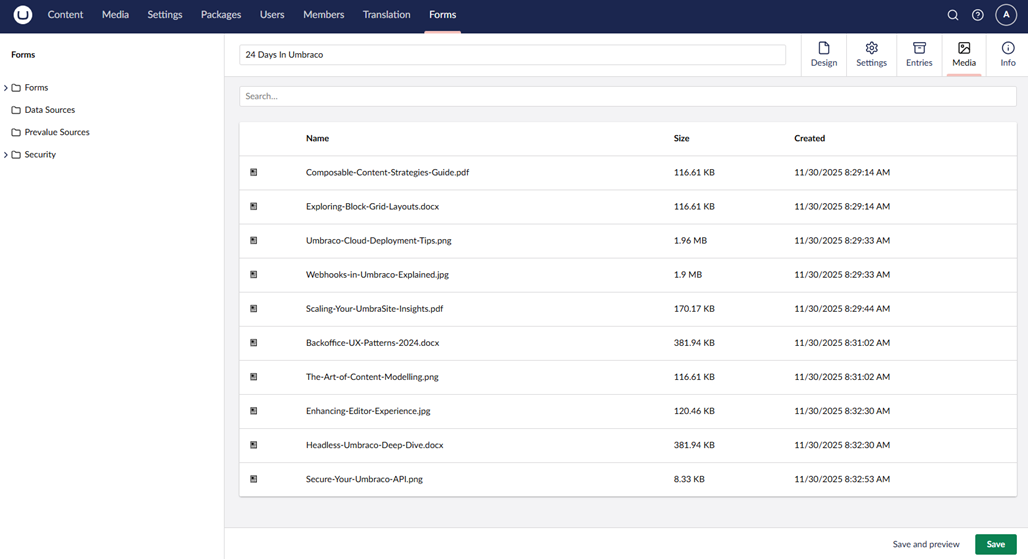
The Media feature in Umbraco.Community.FormsExtensions enhances the Umbraco Forms backoffice experience by allowing editors to view and filter media files submitted through forms. By integrating with Umbraco’s modular plugin ecosystem, this feature brings form-related media directly into the Forms editing and review workflow, saving time and providing better context for editors. This is functionality that already exists by default in Umbraco Forms, but a client asked whether it would be possible to restrict access to form entries for certain users while still allowing access to the uploaded files. That’s why we developed this module. In the future, we plan to extend this feature with improved search capabilities, allowing users to search not only by file name but also within the actual content of the documents.
Central to the feature is an API endpoint that pulls all media submitted with a form. We created a custom management API controller, making sure it was versioned and discoverable in OpenAPI:
[VersionedApiBackOfficeRoute("collection/form-media")]
[MapToApi(FormsExtensionsApiConfiguration.ApiName)]
[ApiExplorerSettings(GroupName = "Form Media")]
public class ByKeyFormMediaCollectionController(
    IBackOfficeSecurityAccessor backOfficeSecurityAccessor,
    IFormMediaListViewService formMediaListViewService,
    FormMediaCollectionPresentationFactory formMediaCollectionPresentationFactory) : ManagementApiControllerBase
{

    [HttpGet]
    [ProducesResponseType(typeof(PagedViewModel<FormMediaResponseModel>), StatusCodes.Status200OK)]
    [ProducesResponseType(typeof(ProblemDetails), StatusCodes.Status400BadRequest)]
    [ProducesResponseType(typeof(ProblemDetails), StatusCodes.Status500InternalServerError)]
    public async Task<IActionResult> ByKey(
        CancellationToken cancellationToken,
        Guid formId,
        string? filter = null,
        int skip = 0,
        int take = 100)
    {
        // Business logic queries media by formId, supports filtering and paging
        // Returns PagedViewModel<FormMediaResponseModel>
    }
}
We kept our TypeScript client strictly in sync with the API, auto-generating it from our shared OpenAPI spec. This eliminates bugs and makes feature iteration fast. The following snippet shows the generated TypeScript client code:
// This file is auto-generated by @hey-api/openapi-ts

import type { Client, Options as Options2, TDataShape } from './client';
import { client } from './client.gen';
import type { GetUmbracoManagementApiV1CollectionFormMediaData, GetUmbracoManagementApiV1CollectionFormMediaErrors, GetUmbracoManagementApiV1CollectionFormMediaResponses } from './types.gen';

export type Options<TData extends TDataShape = TDataShape, ThrowOnError extends boolean = boolean> = Options2<TData, ThrowOnError> & {
    /**
     * You can provide a client instance returned by `createClient()` instead of
     * individual options. This might be also useful if you want to implement a
     * custom client.
     */
    client?: Client;
    /**
     * You can pass arbitrary values through the `meta` object. This can be
     * used to access values that aren't defined as part of the SDK function.
     */
    meta?: Record<string, unknown>;
};

export class FormMediaService {
    public static getUmbracoManagementApiV1CollectionFormMedia<ThrowOnError extends boolean = true>(options?: Options<GetUmbracoManagementApiV1CollectionFormMediaData, ThrowOnError>) {
        return (options?.client ?? client).get<GetUmbracoManagementApiV1CollectionFormMediaResponses, GetUmbracoManagementApiV1CollectionFormMediaErrors, ThrowOnError>({
            security: [{ scheme: 'bearer', type: 'http' }],
            url: '/umbraco/management/api/v1/collection/form-media',
            ...options
        });
    }
}
The Media tab only shows up when you’re editing a form, and stays hidden everywhere else. The view runs on our auto-generated client, so it’s reliable and easy to keep up to date.
Inside the view component, we use the generated client to fetch form media with zero boilerplate:
This ensures models/types are always correct, even if the backend changes, since a regeneration updates both the client and service calls instantly.
By combining an explicit, versioned API, auto-generated TypeScript clients, and context-aware workspace UIs, we’ve delivered a Media feature that just works—for editors and developers alike.
Form Statistics Module
The Form Statistics component provides a clear overview of how your Umbraco Forms are performing. It helps you track submissions, monitor workflow failures, and see where forms are used across your website. This chapter explains the architecture and implementation of the Statistics module, covering both the LIT-based frontend and the C# backend powered by the Umbraco Forms Management API.
Key Features
1. Forms Statistics Overview
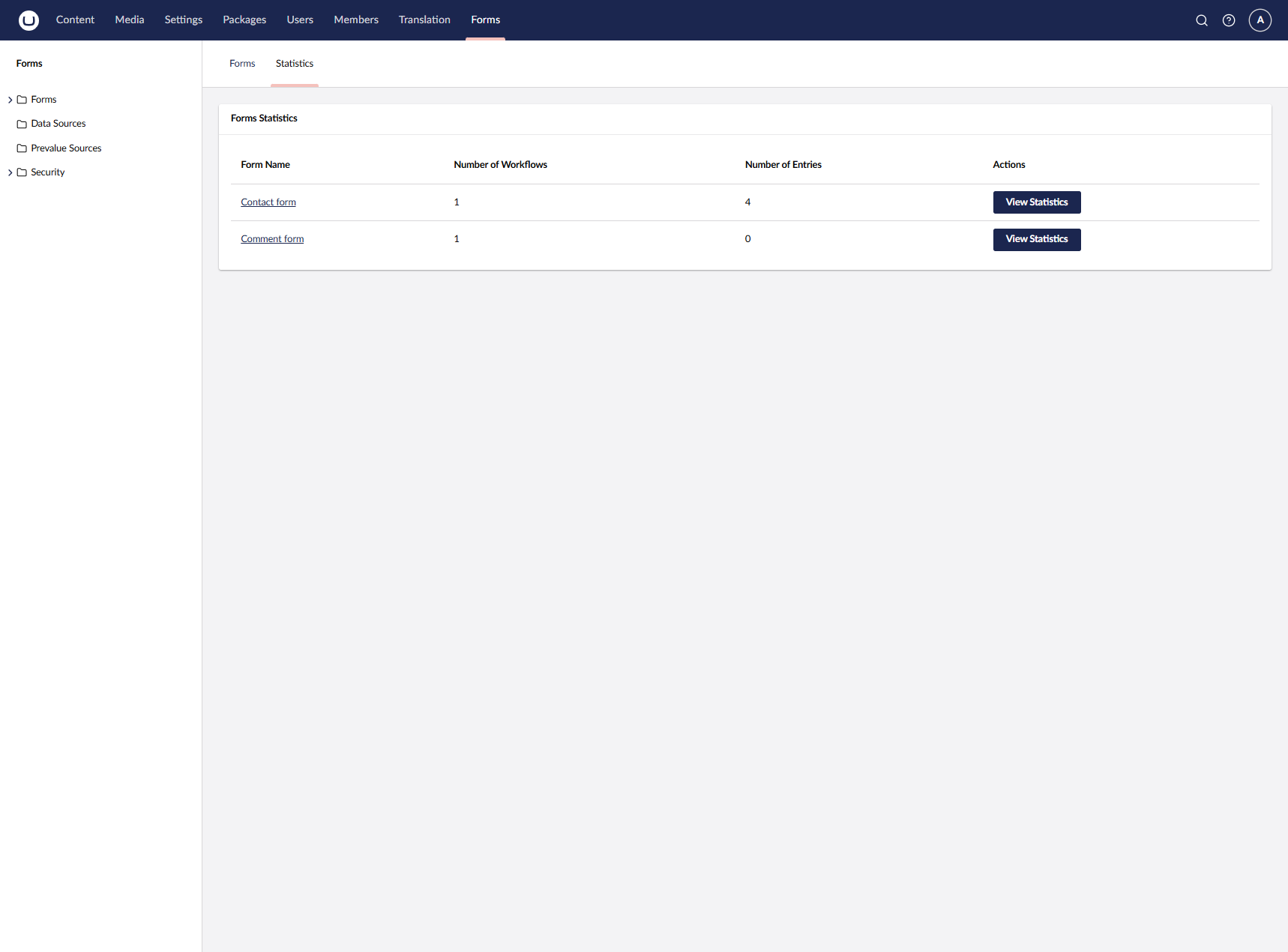
The Statistics dashboard begins with a clear overview of all forms registered in Umbraco Forms. For each form, editors can immediately see:
The total number of workflows
The number of entries submitted
A direct action to open the detailed statistics view
Overview of all forms with workflow and entry counts
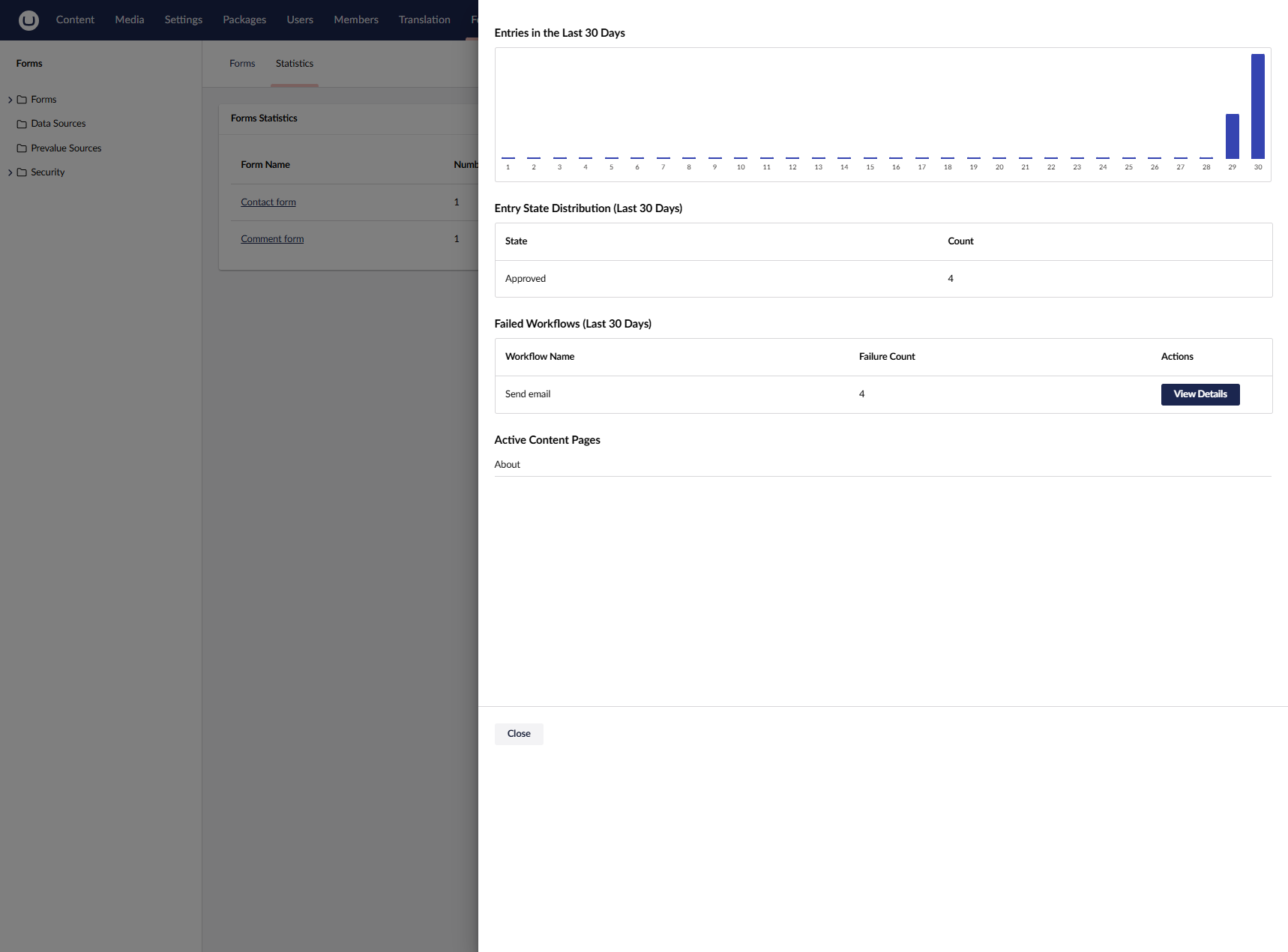
2. Detailed Form Statistics (Last 30 Days) Opening the statistics for a specific form shows a deeper breakdown of activity:
Entries in the last 30 days, visualized in a bar chart
Entry state distribution, summarizing how many entries were Approved, Pending, Rejected, or Failed
Failed workflows summary, grouped by workflow name
Active content pages, showing where the form is used inside the website
Detailed form statistics showing entry trends, state distribution, and failed workflows.
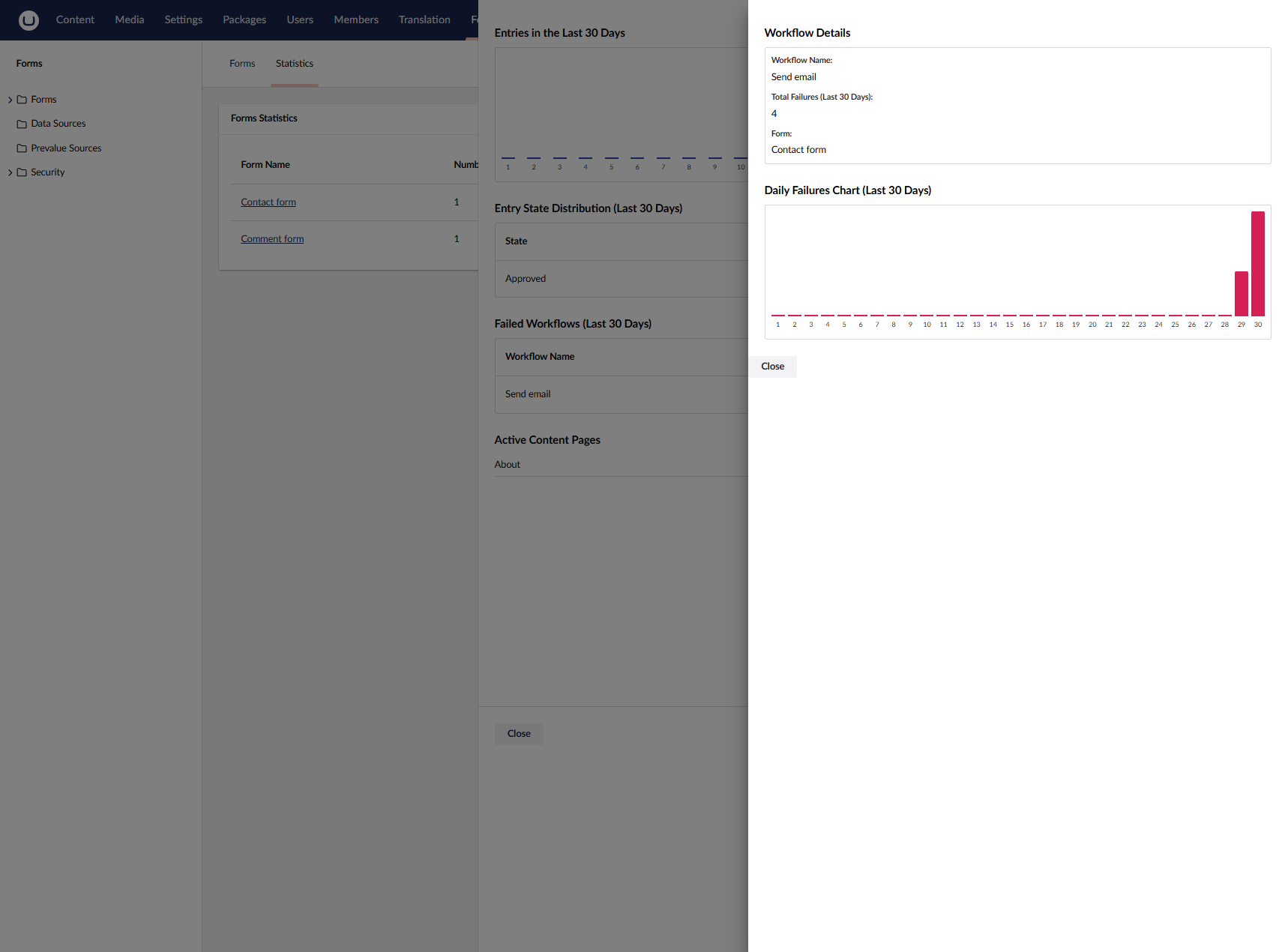
3. Workflow Failure Details From the failed workflow summary, editors can open a detailed view for each workflow. This view shows:
The workflow name
The total number of failures in the last 30 days
The form that triggered the workflow
A day-by-day breakdown of workflow failures
Workflow failure breakdown with day-by-day failure chart for the last 30 days
Frontend Architecture The Statistics component follows the same patterns as the other extension in this package, utilizing LIT for building modern, reactive web components that integrate with the Umbraco backoffice.
The frontend is organized into several key components, each serving a specific purpose:
Dashboard Component (statistics-dashboard.element.ts) The main entry point for the statistics feature, displayed as a dashboard in the Forms section. This component extends UmbElementMixin, which provides access to Umbraco's element API and context system.
The component uses LIT's @state() decorator to manage reactive state. When the component is connected to the DOM (via connectedCallback()), it automatically loads the list of forms from the backend API. The state changes trigger automatic re-rendering of the component's template.
Dialog Component (statistics-dialog.element.ts) A modal dialog that displays detailed statistics for a specific form. This component extends UmbLitElement, which provides additional Umbraco-specific functionality beyond the base LitElement.
The dialog component demonstrates how to consume Umbraco's modal context to receive data passed when the modal is opened. This pattern allows parent components to pass information to modal dialogs without tight coupling.
Modal Token Configuration Umbraco uses a token-based system for registering and opening modals. The statistics-modal.token.ts file defines both the data interface and the modal configuration:
This pattern ensures that the data structure is consistent and type-checked at compile time, preventing runtime errors from mismatched data types.
Manifest Registration
Like the Media component, the Statistics component uses Umbraco's manifest system to register itself with the backoffice. The manifest defines how and where the component should appear:
Dashboard: The main statistics dashboard that appears in the Forms section
Modal: The detailed statistics dialog
Modal: A secondary modal for workflow failure details
The conditions array ensures the dashboard only appears in the Forms section, using the Umb.Condition.SectionAlias condition to match against Umb.Section.Forms.
API Client Initialization
The frontend uses an entry point pattern to initialize the API client with proper authentication. Importantly, the API client itself is not manually written it is automatically generated from Swagger JSON that comes from an Umbraco endpoint we created.
Umbraco automatically generates OpenAPI/Swagger documentation for all Management API controllers, including our FormsStatisticsController. This Swagger specification is then used to generate a fully type-safe TypeScript client.
import type { UmbEntryPointOnInit } from '@umbraco-cms/backoffice/extension-api';
import { UMB_AUTH_CONTEXT } from '@umbraco-cms/backoffice/auth';
import { createClient } from './backend-api/client/index.js';
import type { Client } from './backend-api/client/index.js';

let apiClient: Client;

export const getApiClient = (): Client => {
	if (!apiClient) {
		throw new Error('API client not initialized. Make sure onInit has been called.');
	}
	return apiClient;
};

export const onInit: UmbEntryPointOnInit = (host) => {
	host.consumeContext(UMB_AUTH_CONTEXT, (auth) => {
		if (!auth) {
			return;
		}

		const config = auth.getOpenApiConfiguration();
		apiClient = createClient({
			baseUrl: config.base,
			credentials: config.credentials,
		});

		apiClient.interceptors.request.use(async (request, _options) => {
			const token = await auth.getLatestToken();
			// Create new headers from existing request headers
			const headers = new Headers(request.headers);
			headers.set('Authorization', `Bearer ${token}`);
			// Clone request with new headers
			return new Request(request, {
				headers: headers,
			});
		});
	});
};
The entry point consumes the Umbraco authentication context to obtain the current user's authentication token. This token is automatically added to all API requests via an interceptor, ensuring that all calls to the backend are properly authenticated.
The generation process works as follows: when you create a Management API controller in Umbraco (like our FormsStatisticsController), Umbraco automatically exposes it in the Swagger/OpenAPI documentation endpoint. This Swagger JSON is then used with tools like @hey-api/openapi-ts to generate a complete TypeScript client with all the types, methods, and request/response models. This means you don't have to manually write API client code or maintain type definitions—they're automatically kept in sync with your backend API.
Backend Architecture
As with the frontend, also the C# backend follows a clean, layered architecture that leverages the Umbraco Forms Management API to retrieve and process form data. The implementation demonstrates how to integrate with existing Umbraco APIs while maintaining separation of concerns.
Controller Layer
The FormsStatisticsController extends ManagementApiControllerBase, which provides the foundation for Umbraco's Management API controllers:
[VersionedApiBackOfficeRoute("collection/form-statistics")]
[MapToApi(FormsExtensionsApiConfiguration.ApiName)]
[ApiExplorerSettings(GroupName = "Form Statistics")]
public class FormsStatisticsController(IFormsStatisticsService formsStatisticsService)
    : ManagementApiControllerBase
{
	/// <summary>
	/// Gets a list of all forms with their statistics
	/// </summary>
	/// <returns>List of forms with statistics</returns>
	/// <response code="200">Returns the list of forms</response>
	/// <response code="401">Unauthorized</response>
	[HttpGet]
	[ProducesResponseType(typeof(IEnumerable<FormStatisticsResponseModel>), StatusCodes.Status200OK)]
	public async Task<IActionResult> GetForms()
	{
		try
		{
			var result = await formsStatisticsService.GetFormsStatisticsAsync();
			return Ok(result);
		}
		catch (Exception ex)
		{
			return StatusCode(StatusCodes.Status500InternalServerError, $"Error retrieving forms: {ex.Message}");
		}
	}

	[HttpGet("{formId}")]
	[ProducesResponseType(typeof(FormStatisticsDetailsResponseModel), StatusCodes.Status200OK)]
	[ProducesResponseType(StatusCodes.Status400BadRequest)]
	[ProducesResponseType(StatusCodes.Status404NotFound)]
	public async Task<IActionResult> GetFormDetails([Required] string formId)
	{
		/// implementation
	}

	[HttpGet("{formId}/workflow/{workflowName}/daily-failures")]
	[ProducesResponseType(typeof(WorkflowDailyFailureStatisticsResponseModel), StatusCodes.Status200OK)]
	[ProducesResponseType(StatusCodes.Status400BadRequest)]
	public async Task<IActionResult> GetWorkflowDailyFailures([Required] string formId, [Required] string workflowName)
	{
		/// implementation
	}
}
The controller uses constructor injection to receive the IFormsStatisticsService, following dependency injection best practices. The route is defined using VersionedApiBackOfficeRoute, which automatically prefixes the route with /umbraco/management/api/v1/collection/form-statistics.
Service Layer
The FormsStatisticsService is where the business logic resides. It orchestrates calls to the Forms Management API and processes the results:
/// <summary>
/// Service for retrieving and processing forms statistics
/// </summary>
internal class FormsStatisticsService(IFormsManagementApiClient apiClient,ILogger logger) : IFormsStatisticsService
{
    /// <summary>
	/// Gets a list of all forms with their statistics
	/// </summary>
	public async Task<List<FormStatisticsResponseModel>> GetFormsStatisticsAsync()
	{
		var forms = await apiClient.GetFormsAsync();
		var result = new List<FormStatisticsResponseModel>();

		// For each form, get workflow count and entry count
		foreach (var form in forms)
		{
			var numberOfWorkflows = 0;
			var numberOfEntries = 0;

			try
			{
				// Get form design to count workflows
				var formDesign = await apiClient.GetFormDesignAsync(form.Id);
				numberOfWorkflows = formDesign?.FormWorkflows?.Count ?? 0;

				// Get total entry count
				var records = await apiClient.GetFormRecordsAsync(form.Id, take: 1);
				numberOfEntries = (int)(records?.TotalNumberOfResults ?? 0);
			}
			catch
			{
				// Continue with default values if individual form details fail
			}

			result.Add(new FormStatisticsResponseModel
			{
				Id = form.Id,
				Name = form.Name,
				NumberOfWorkflows = numberOfWorkflows,
				NumberOfEntries = numberOfEntries
			});
		}

		return result;
	}

	/// more functions here
}
The service demonstrates a key pattern: it makes multiple API calls to gather comprehensive information. For each form, it retrieves the following:
form design to count workflows
form record metadata to get the total entry count efficiently
The service gracefully handles failures for individual forms, ensuring that one problematic form doesn't prevent statistics from being returned for all other forms.
Forms Management API Client
The FormsManagementApiClient is responsible for making HTTP calls to the Umbraco Forms Management API. This client abstracts away the details of HTTP communication and authentication:
/// <summary>
/// Client for interacting with Umbraco Forms Management API
/// </summary>
public class FormsManagementApiClient(
    IHttpClientFactory httpClientFactory,
    IHttpContextAccessor httpContextAccessor) : IFormsManagementApiClient
{
    private const string FormsManagementApiBaseUrl = "/umbraco/forms/management/api/v1";

    private static readonly JsonSerializerOptions JsonOptions = new()
    {
        PropertyNameCaseInsensitive = true
    };

    /// <summary>
    /// Creates an authenticated HttpClient for API calls
    /// Prioritizes Authorization header from frontend request
    /// </summary>
    private Task<HttpClient> CreateAuthenticatedHttpClientAsync()
    {
        var request = httpContextAccessor.HttpContext?.Request;
        if (request == null)
        {
            throw new InvalidOperationException("HttpContext is not available");
        }

        var httpClient = httpClientFactory.CreateClient();
        httpClient.BaseAddress = new Uri(request.Scheme + "://" + request.Host);

        // Priority 1: Use Authorization header from frontend request if present
        if (request.Headers.TryGetValue("Authorization", out var authHeader))
        {
            httpClient.DefaultRequestHeaders.Authorization =
                AuthenticationHeaderValue.Parse(authHeader.ToString());
        }

        return Task.FromResult(httpClient);
    }

    /// <summary>
    /// Gets all forms from the Forms Management API
    /// </summary>
    public async Task<List<BasicFormResponse>> GetFormsAsync()
    {
        var result = await GetFromApiAsync<List<BasicFormResponse>>(
            $"{FormsManagementApiBaseUrl}/form",
            "retrieve forms from Forms Management API",
            throwOnError: true);

        // Ensure we never return null
        return result ?? new List<BasicFormResponse>();
    }

    /// <summary>
    /// Gets form design details from the Forms Management API
    /// </summary>
    public Task<FormDesignResponse?> GetFormDesignAsync(string formId)
    {
        return GetFromApiAsync<FormDesignResponse?>(
            $"{FormsManagementApiBaseUrl}/form/{formId}",
            "retrieve form from Forms Management API",
            throwOnError: true,
            treatNotFoundAsNull: true);
    }

}
The client uses IHttpContextAccessor to access the current HTTP request context, allowing it to forward the authentication header from the frontend request. This is crucial because the frontend makes authenticated requests to the Statistics API, and those requests need to be sent to the Forms Management API with the same authentication.
The client provides methods for all the Forms Management API endpoints used by the Statistics service:
GetFormsAsync(): Retrieves all forms
GetFormDesignAsync(): Retrieves form design, including workflows
GetFormRecordsAsync(): Retrieves form entries with optional date filtering
GetFormRecordMetadataAsync(): Retrieves form record metadata, including total entry count
GetFormRelationsAsync(): Retrieves content pages where the form is used
GetWorkflowAuditTrailAsync(): Retrieves workflow execution history for a specific entry
Statistics Features
The Form Statistics component provides several key insights into your forms' performance and usage. Each feature is designed to help you understand how your forms are being used and identify potential issues.
Dashboard Overview
The main dashboard displays a table of all forms with summary statistics:
Form Name: A clickable link that opens the form in the Umbraco backoffice
Number of Workflows: The count of workflows configured for each form
Number of Entries: The total number of form submissions
This overview allows you to quickly identify which forms are most active and which have the most complex workflow configurations.
Detailed Form Statistics
When you click "View Statistics" for a specific form, a detailed modal opens showing comprehensive analytics:
Entries in the Last 30 Days: A visual bar chart displaying daily submission counts over the past 30 days. This helps you identify trends, peak usage periods, and any unusual patterns in form submissions. The chart includes all 30 days, even if some days have zero submissions, providing a complete picture of form activity.
Failed Workflows: A list of workflows that have failed during execution, showing:
Workflow Name: The name of the workflow that failed
Failure Count: The number of times this workflow has failed in the last 30 days
Each failed workflow includes a "View Details" button that opens a secondary modal displaying daily failure statistics for that workflow. This helps you identify problematic workflows and understand when failures are occurring.
Active Content Pages: A list of content pages where the form is currently being used. This is determined by:
Form relations (explicit relationships between forms and content)
Entry metadata (the umbracoPage field in form entries)
This feature helps you understand where your forms are deployed and can be useful for content audits or when planning form updates.
Data Processing
The Statistics service processes data from multiple sources to provide these insights:
Form Design API: Retrieves form configuration, including workflow definitions
Form Records API: Retrieves entry data with date filtering and pagination
Form Relations API: Retrieves content pages where forms are used
Workflow Audit Trail API: Retrieves detailed workflow execution history
Wrapping Up
Building Umbraco.Community.FormsExtensions has been a great test of how far we can push Umbraco when you approach it as a modular platform rather than a fixed feature. Throughout this project, we learned that scaling custom functionality is not just about adding features, but about designing the solution in a way that keeps every part independent, testable, and easy to maintain.
By splitting the package into small, focused modules, we created a foundation that makes it easier to experiment, release features separately, or even replace entire parts without affecting the rest. This approach also makes it clearer for contributors and other teams how everything fits together.
Several aspects proved especially valuable:
Separate modules per feature Each extension, such as Media or Statistics, is implemented as its own class library and RCL with separate backend logic, assets, and frontend code. This keeps the codebase clean and structured.
Centralized OpenAPI registration By grouping all Swagger/OpenAPI configuration inside the .Common project, extensions can simply register themselves under the same API definition. This results in a consistent and unified Management API.
Auto-generated frontend SDKs With openapi-ts, the frontend client is automatically generated from the shared swagger.json file. Backend and frontend stay in sync, and the risk of errors drops significantly.
Manifests as entry points into the Backoffice The Umbraco 14+ manifest architecture makes it possible to dynamically add repositories, dashboards, modals, and menu items without touching the core codebase.
Vite-powered isolated builds Each module ships with its own build pipeline for CSS and JavaScript, providing clean and predictable output for the App_Plugins directory.
Because of this setup, the package doesn’t feel like one large extension, but rather a collection of small, self-contained building blocks that together create a richer experience. It’s flexible enough to let developers pick only the modules they need for their project.
We hope this approach inspires others to think about Umbraco extensions in the same way: small, modular, well-structured, and ready to grow. In the coming period, we’ll continue expanding the modules, refining the statistics dashboard, and working toward a stable release. Until then, we invite you to explore the package, share feedback, or even contribute ideas.