Quite some time ago, I had the following request from a project manager at my workplace:
Building My First Umbraco Package: Creating the Lorem Ipsum Generator
- Tagged with:
- Backoffice
- Community
- Contribution
- Package
- v13
- v17
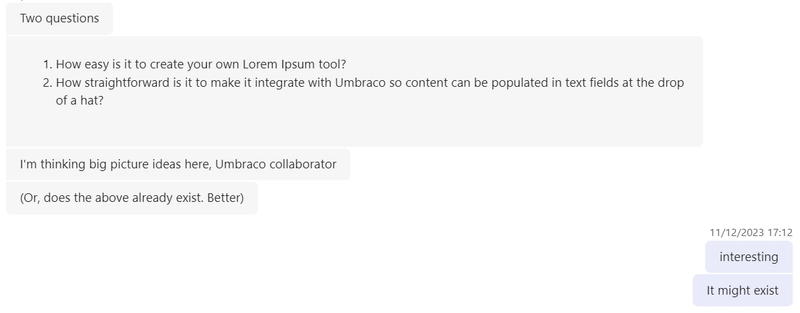
After some quick research on NuGet + the Umbraco Marketplace, I replied with "it doesn't exist".
About a year later… I finally decided to give it a go at the Umbraco Spark Hackathon.
Umbraco Spark is a developer-focused conference usually held in March in Bristol. It leans heavily into the tech side of things, with talks by developers showcasing cool technologies they've worked with or sharing tricks they've picked up along the way. This year marked my third Umbraco Spark.
The event
Before attending Umbraco Spark this year, it was announced that the hackathon would take a slightly different approach: it would focus on building packages. The idea was to let people form groups and brainstorm ahead of time. It gave attendees a chance to come prepared, and let's face it, it's getting harder to create those low-hanging fruit PRs nowadays, with Umbraco improving so rapidly (they’re just too good at squashing bugs now!). That’s when I remembered the message above - and decided this was my moment to give this package-building thing a go.
Where did I start?
I went right back to where I’d left off. First stop: double-checking to see if anyone had built the package in the meantime. Thankfully, no one had!
Next, I dove into the TinyMCE documentation. I’d never extended the Rich Text component before, so I wanted to really understand how it all worked before diving into the build. I decided to start with a basic project that just focused on the TinyMCE extension, which didn’t involve Umbraco at all.
I installed the TinyMCE package and a Lorem Ipsum npm package. After playing around for a while, and switching back and forth between documentation, Google and VSCode, I ended up with something that looked a bit like a lorem ipsum generator:
editor.ui.registry.addMenuButton('loremIpsumButton', {
  text: 'Add Lorem Ipsum',
  fetch: (callback) => {
    const items = [
      {
        type: 'menuitem',
        text: 'Short sentence',
        icon: 'horizontal-rule',
        onAction: () =>
          editor.insertContent(loremIpsum({ count: 1, units: 'sentences' })),
      },
      {
        type: 'menuitem',
        text: 'Enter custom number of sentences',
        icon: 'border-width',
        onAction: () => {
          editor.windowManager.open({
            title: 'Generate Lorem Ipsum',
            body: {
              type: 'panel',
              items: [
                {
                  type: 'input',
                  name: 'count',
                  label: 'Number of sentences',
                  inputMode: 'numeric',
                },
              ],
            },
            buttons: [
              {
                type: 'submit',
                text: 'Insert',
              },
              {
                type: 'cancel',
                text: 'Cancel',
              },
            ],
            onSubmit: (api) => {
              const data = api.getData();
              const count = parseInt(data.count, 10) || 1;

              editor.insertContent(loremIpsum({ count, units: 'sentences' }));
              api.close();
            },
          });
        },
      },
    ];
    callback(items);
  },
});
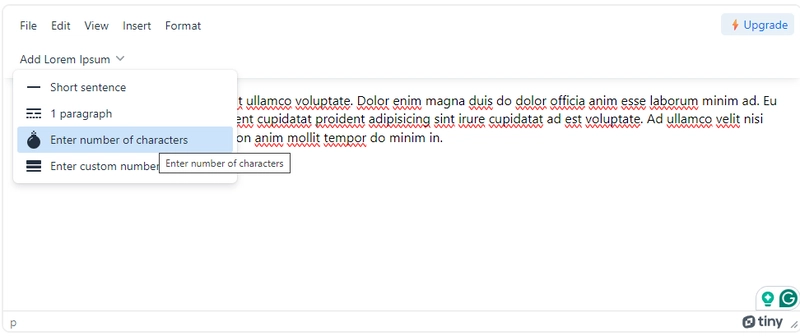
I was pretty happy with where I had managed to get, and it was fun figuring out all of the different ways I could add the lorem ipsum. This all happened in a couple of evenings running up to the hackathon, so I felt prepared for the day to try to turn this into a package.
Hackathon day:
When hackathon day arrived, I was armed with ideas and ready to build my package. I had planned to use the Opinionated Starter Package, so that’s where I began. I mostly followed the instructions provided with the package, and it came with the Umbraco site pre-installed, which made it much easier to test and configure the extension as needed.
Since I already had my Lorem Ipsum code, I used it to create a file within the solution and copied and pasted my code into the new codebase. The only catch was that it needed to be in JavaScript rather than TypeScript, so I had to convert it first.
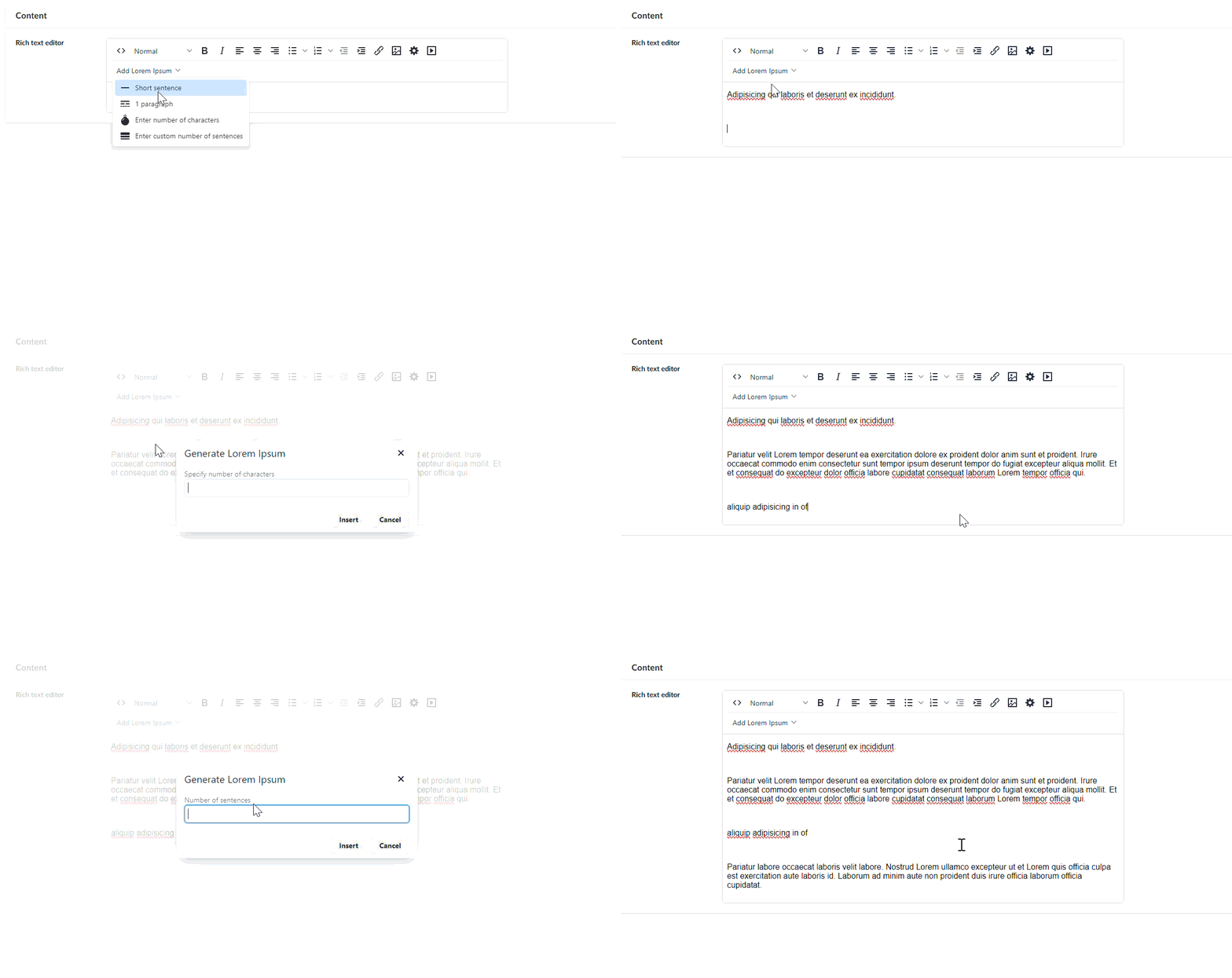
And then it was a case of creating the RteExtensionComposer, which allows me to create a new ‘Lorem Ipsum’ button, and configure the code it needs to reference. This setup allows editors to insert placeholder text directly from the RTE using this new functionality.
using Microsoft.Extensions.DependencyInjection;
using Umbraco.Cms.Core.Composing;
using Umbraco.Cms.Core.Configuration.Models;
using Umbraco.Cms.Core.DependencyInjection;
using static Umbraco.Cms.Core.Configuration.Models.RichTextEditorSettings;

namespace Umbraco.Community.LoremIpsumGenerator;

public class RteExtensionComposer : IComposer
{
    public void Compose(IUmbracoBuilder builder)
    {
        builder.Services.PostConfigure<RichTextEditorSettings>(settings =>
        {
            settings.CustomConfig.Add(
                "external_plugins", "{\"lorem-ipsum\":\"/App_Plugins/LoremIpsumGenerator/loremipsumplugin.umd.js\"}"
                );
            var commands = settings.Commands.ToList();
            commands.Add(new RichTextEditorCommand
            {
                Alias = "loremIpsumButton",
                Name = "Lorem Ipsum",
                Mode = Cms.Core.Models.ContentEditing.RichTextEditorCommandMode.Insert
            });
            settings.Commands = commands.ToArray();
        });
    }
}
After extensive testing, I was finally ready to publish the package to the Umbraco Marketplace and NuGet. I created a README file, set the version number, and added the appropriate tag in GitHub. It took about three attempts to get everything live on NuGet and the Marketplace, with some fellow Umbracians kindly installing the package to confirm it worked for them.
Some final thoughts:
Overall, I really enjoyed working on this package during Umbraco Spark. It was also fun to get up on stage the following day and demo it to the audience at the Umbraco Spark Package Awards. I hope this marks the beginning of my journey into package development.
And whilst most people would likely build something like this for their own projects without turning it into a full package, it was a good learning experience - and a package that has been installed on quite a few true projects now! But one of my main motivations was that I’d never created a package before, and I wanted a manageable challenge to help me reach that goal.
When deciding which versions to build this package on, version 13 felt like the obvious choice. V13 was the current LTS release, and it’s what we predominantly use at work. Sticking with it made sense, and I imagine that’s true for many others as well.
In v13, customising the editor was fairly well documented, and there were examples to follow. Right now, there aren’t many guides or examples showing how to extend the Rich Text Editor, so it feels like I’m figuring things out from scratch.
I had originally wanted to use TipTap, but I found its extension documentation tough to follow, especially while also trying to get my head around v17. Falling back to TinyMCE was the safer option. I’d still love to create a TipTap version in the future, and I suspect most of my struggles were simply due to my lack of experience with using TipTap and V17.
Despite the bumps, I am looking forward to using v17 more, and I know I will finish upgrading the package soon. I expect that as more people adopt the new LTS, we’ll see better documentation and more shared examples. For now, upgrading packages and our projects is a mix of experimenting, researching, and accepting that other community packages are still catching up.