Theme:

Lessons learned on my first Umbraco Commerce project

Tagged with:
Commerce
v17
Building my first e-commerce solution with Umbraco Commerce has been a good learning opportunity.

Being very comfortable with Umbraco CMS, I was curious to see how Umbraco Commerce worked and fit in as a package. Here are my key learnings that might help others with their first Umbraco Commerce project.

Start with the Documentation (seriously!)

The Umbraco Commerce documentation is excellent, particularly the Key Concepts and tutorial-style articles, they provide a solid foundation for understanding how the system works.

I'd also recommend the official demo store repository https://github.com/umbraco/Umbraco.Commerce.DemoStore - it's a complete working example that demonstrates how to get a full cart and order flow set up.

Getting to know the Default Properties

One aspect that took me a while to figure out is how Umbraco Commerce uses certain default properties throughout the system in specific ways. They are documented here: https://docs.umbraco.com/umbraco-commerce/key-concepts/properties#order-property-map.

These properties if used will show up for example in the backoffice under orders, like the customer details on the right here:
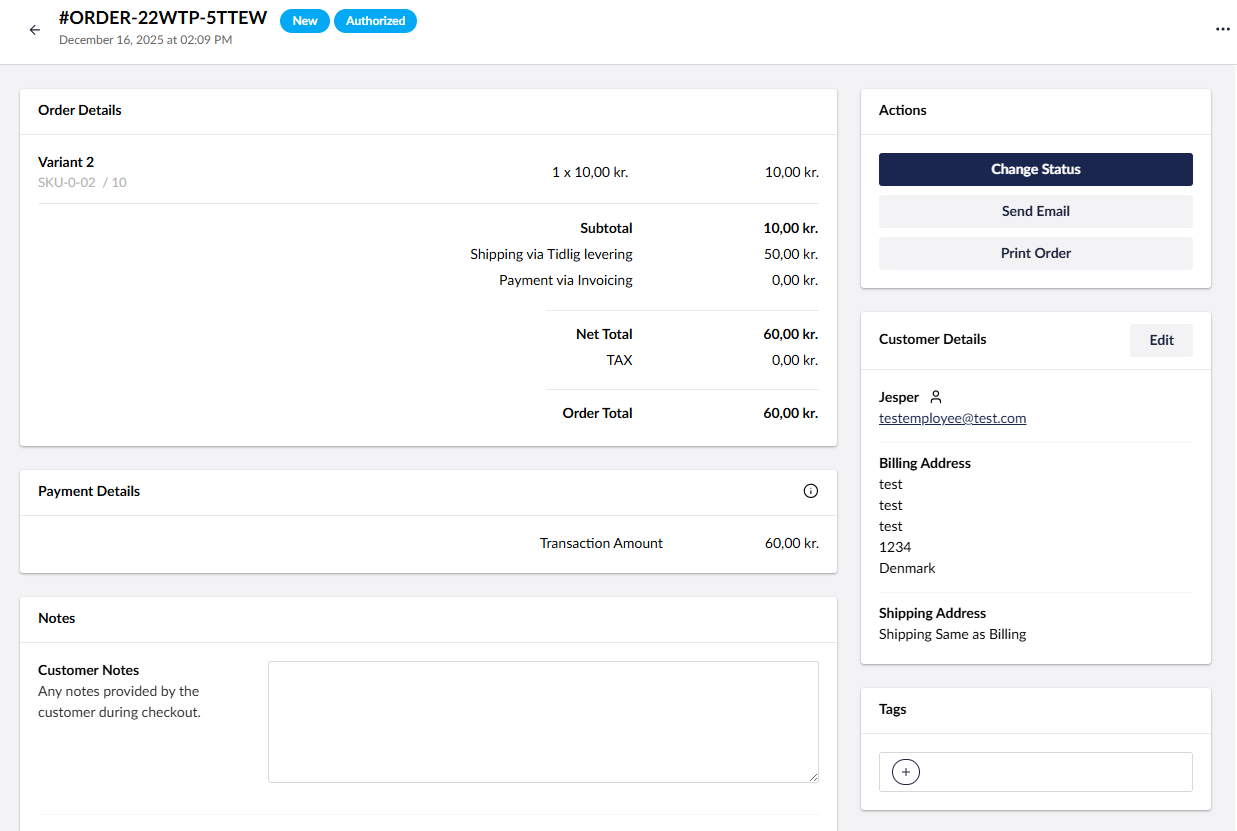
Showing an order with customer detail fields in the backoffice

Several of the tutorials and examples use some of these, but some of the examples also use other custom properties that correspond to nothing by default, and only a few of them have constants in Umbraco Commerce.

So for example figuring out how to set the customer notes took me a while. Several of the examples set a "notes" property which did nothing, but if you check the link above they are all listed so you know what alias' to give your properties!

The ProductAdapter

You can set up a custom ProductAdapter to fetch products from an external source if you don't want them as content nodes.

In my case we have products in a PIM and they are then stored in an index. So I set up a product adapter to fetch the products from the index.

At first it seemed simple, the base class has methods you can override that will take for example a sku and return a model (IProductSnapshot).

However, it was not clear how to set certain properties, like for example weight which was needed to set up dynamic shipping prices based on the total weight of an order.

After a lot of digging I found that there are some additional undocumented variations of IProductSnapshot that extend upon it and are valid return types:

  • IProductSnapshotWithImage
  • IProductSnapshotWithCategories
  • IProductSnapshotWithMeasurements

Custom Emails

I initially thought implementing custom email notifications at different stages of the order flow would be straightforward.

I guess I expected something like setting up workflows in Umbraco Forms where you could just add multiple from within the backoffice.

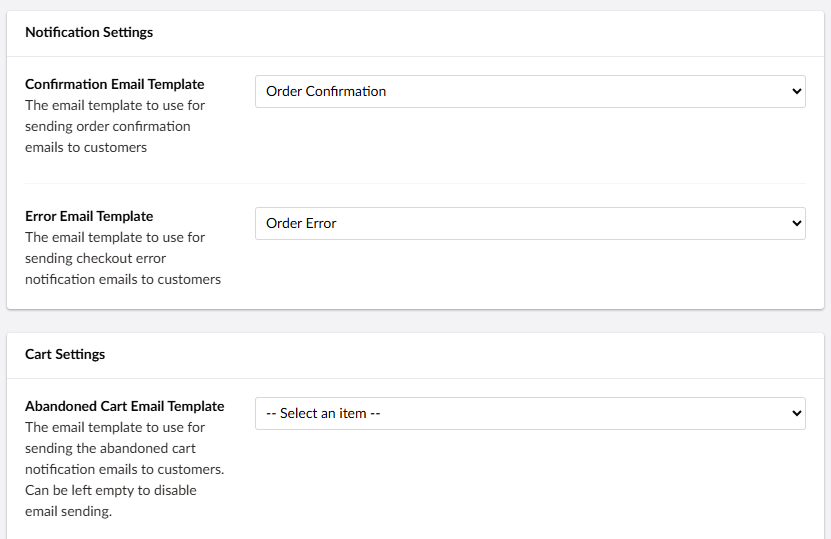
Within your store settings you can set the email templates to use for the default emails the store will send:

A stores email template settings in the backoffice

But for the site I am building we had a need to send an order confirmation to the user, but also send a similar email to their NAV system to log the sale.

I found the email templates section in the store settings and added a new email template - I figured if I selected the Category "Order" it would automatically send when an order is completed, but that was not the case:

A custom email template in the backoffice

At the bottom of that page you also need to set a path to your email template view - luckily you can download the existing templates here to edit to your need: https://docs.umbraco.com/umbraco-commerce/how-to-guides/customizing-templates

Once you have set up a new email template within your settings section in Umbraco and also pointed it to a view you'd like to use, you can add a new notification listener in your Umbraco Commerce builder:


builder.WithNotificationEvent<EmailSentNotification>().RegisterHandler<CustomEmailSentNotification>();

Then within your CustomEmailSentNotification you can use the event to check what the type of the email it just sent is, in my case I'd like to send an additional email once the order confirmation email was sent.

You can use the IEmailTemplateService to get your template by alias (this is the alias found in the backoffice under your email template node), and then you can also use the service to send an email with that template:


public class CustomEmailSentNotification : NotificationEventHandlerBase<EmailSentNotification>
{
    private readonly IEmailTemplateService _emailTemplateService;

    public CustomEmailSentNotification(IEmailTemplateService emailTemplateService)
    {
        _emailTemplateService = emailTemplateService;
    }

    public override async Task HandleAsync(EmailSentNotification evt)
    {
        if (evt.EmailContext.EmailTemplate.Alias == "orderConfirmation")
        {
            if (evt.EmailContext.Model is OrderReadOnly order)
            {
                var emailTemplate = await _emailTemplateService.GetEmailTemplateAsync(order.StoreId, "orderToNav");
                await _emailTemplateService.SendEmailAsync(emailTemplate, order);
            }
        }
    }
}

Multiple carts per member

Another requirement we had on the site that is not really apparent how to do is that each member who is logged in will be part of multiple "projects". Each project has custom prices but will also need their own carts that are independant of eachother.

Whenever you need to get the current order or create a new one, the documented way is to call the GetOrCreateCurrentOrderAsync() method from within a Unit of work:


await _commerceApi.Uow.ExecuteAsync(async uow =>
{
    var order = await _commerceApi.GetOrCreateCurrentOrderAsync(storeId, memberEmail).AsWritableAsync(uow);

And that is great a lot of the time, but in my example with needing multiple carts per member it would always just use the latest still open order when you call that, I needed a way to both tag orders to projects and also have a way to set the current order to a different one based on that tag.

Luckily there is an IOrderService that can be used to fetch all current orders for a member, and an ISessionManager that can be used to change the current order:


public async Task ChangeCart(Guid storeId, string email, string projectId, string culture = "da-DK")
{
    var orders = await _orderService.GetAllOrdersForCustomerAsync(storeId, email).ToListAsync();

    foreach (var order in orders)
    {
        if (!order.Properties.TryGetValue("projectId", out var selectedProjectId))
        {
            continue;
        }

        if (selectedProjectId == projectId)
        {
            // Set the current sessions order to the right cart
            await _sessionManager.SetCurrentOrderAsync(storeId, order.Id);
            return;
        }
    }

And if one does not already exist for that project, we can create a new one, set the project Id as a property and set it as the current order in the sessionManager:


try
{
    await _commerceApi.Uow.ExecuteAsync(async uow =>
    {
        var currencies = await _commerceApi.GetCurrenciesAsync(storeId).ToListAsync();
        var defaultCurrency = await _commerceApi.GetDefaultCurrencyAsync(storeId);
        var selectedCurrency =
            currencies.FirstOrDefault(x => string.Equals(x.CultureName, culture, StringComparison.InvariantCultureIgnoreCase))?.Id
            ?? defaultCurrency.Id;

        var taxClass = await _commerceApi.GetDefaultTaxClassAsync(storeId);
        var orderStatus = await _commerceApi.GetOrderStatusAsync(storeId, "new");

        // Get defaults for otherwise nullable ids in Order.CreateAsync as it fails otherwise
        var paymentMethod = await _commerceApi.GetDefaultPaymentMethodAsync(storeId);
        var paymentCountry = await _commerceApi.GetDefaultPaymentCountryAsync(storeId);
        var paymentRegion = await _commerceApi.GetDefaultPaymentRegionAsync(storeId);
        var shippingMethod = await _commerceApi.GetDefaultShippingMethodAsync(storeId);
        var shippingCountry = await _commerceApi.GetDefaultShippingCountryAsync(storeId);
        var shippingRegion = await _commerceApi.GetDefaultShippingRegionAsync(storeId);

        var order = await Order
            .CreateAsync(
                uow,
                storeId,
                culture,
                selectedCurrency,
                taxClass.Id,
                orderStatus.Id,
                paymentMethod.Id,
                paymentCountry.Id,
                paymentRegion.Id,
                shippingMethod.Id,
                shippingCountry.Id,
                shippingRegion.Id,
                customerReference: email
            )
            .SetPropertyAsync("projectId", projectId);
        await _commerceApi.SaveOrderAsync(order);
        await _sessionManager.SetCurrentOrderAsync(storeId, order.Id);

        uow.Complete();
    });
}
catch (ValidationException ex)
{
    _logger.LogError(ex, "Error changing cart for {email} with projectId: {projectId}", email, projectId);
}

Final thoughts

I would definitely recommend trying out Umbraco Commerce, it feels well documented and intuitive to use!

It's main challenge right now is that the amount of examples, blogposts, forum posts, etc. are very limited so doing things beyond the documentation can be a struggle.

For the things I've had to raise issues about Umbraco has been very fast to respond though!

If you are starting a new project I would advise the following:

  1. Start with the official demo store - don't skip this
  2. Read the Key Concepts documentation thoroughly before diving into code
  3. Don't be afraid to raise issues
  4. If you figure out how to do something, please blog about it or make PRs to the documentation